
HyperX Ducky One 2 Mini DIP Switch Functions
Updated
Ducky One 2 Mini DIP Switch Functions
Key Switch Function
Applicable keys: Fn/Alt/Ctrl/Windows/Caps lock
Operation:
Press Fn + Alt + k for 5 seconds.
Until the ESC, L_Ctrl, L_Win, L_Alt, R_Alt, R_Win, Fn, R_Ctrl, and Caps lock keys are all lighting up. The colorways are respectively pink, red, orange, yellow, green, blue, indigo, and purple.
Except for the Caps lock key, the rest of the 6 keys are able to switch each function and color at will. (2 keys max at the same time)
Press Caps lock once will change its own function to Fn ( turns into indigo LED color) then L_Ctrl key (turns into red LED color) in order.
Press the Esc key once to finish the switching function. Note: You can press the Esc key to leave the switching function before starting it.
DIP Switch Functions
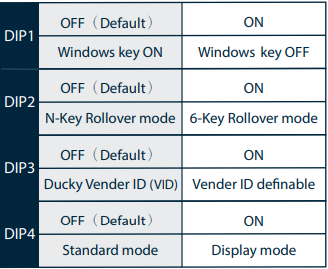
Note : You can input the ideal VID in both situations, but the VID can be only changed when DIP 3 turned on.