
HyperX Ducky One 2 Mini RGB Backlight Modes
Updated
Ducky One 2 Mini RGB Backlight Modes
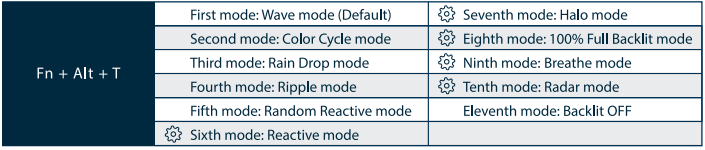
All above modes can be adjusted with the following key sequence:
Fn + Alt + J:Decrease speed
Fn + Alt + L:Increase speed
Hold Fn + Alt + T for 3 seconds to turn o all backlit (including CM1 and CM2)
Only the backlit modes can be adjusted using the following:
Fn + Alt + Z: Adjust color red (R) brightness. 10 Levels.
Fn + Alt + X:Adjust color green (G) brightness. 10 Levels.
Fn + Alt + C:Adjust color blue (B) brightness. 10 Levels.
Fn + Alt + V: Erase red, green, and blue color settings.
Fn + Alt + Spacebar (Color palette): Activate the color palette to display various colors on each key, press on the desired color, all the keys will automatically change to match.